In order to measure the impact of the cookie banner on conversion, we at Halbstark conducted Halbstark experiment: we compared two identical websites—one with and one without a cookie banner. To do this, we developed a classic A/B test, as is common in UX/UI design, consisting of the following two variables:
- Website cookie banner, or website C for short
- Website Direct, abbreviated Website D
Both websites pursue the same goal: generating leads in the test setup in the form of email addresses. The page on which the email addresses are to be entered is referred to in this experiment as the lead page . This page is the same for website C and website D. The email addresses are always entered in the same way. The only difference is the landing page. A landing page is the page where the user first "lands," the first page they visit. While on website D, the user is taken directly to the lead page for entering email addresses via a Facebook campaign, on website C, the user must first interact with the cookie banner before they can visit the lead page. For simplicity, the process is shown below as a funnel.
- Website C: Facebook campaign > Cookie banner (landing page) > Lead page > (Conversion)
- Website D: Facebook campaign > Lead page (landing page) > (Conversion)
For the study, a cookie banner will first be designed in accordance with GDPR requirements, followed by the lead page. The test groups will be directed to one of the two landing pages using Facebook advertisements.
Website implementation
In order to implement consent to data processing in accordance with the General Data Protection Regulation in the form of a cookie banner, the theoretical principles of the GDPR outlined in the previous blog post must first be put into practice. The cookie banner consists of eight essential elements:
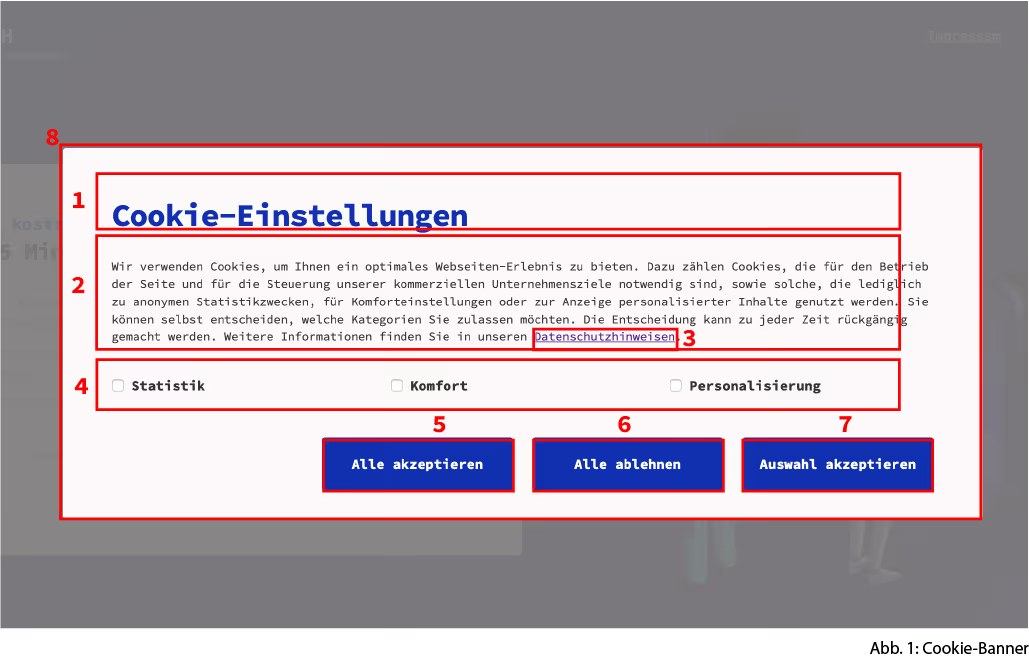
1: Cookie settings heading: Here , the user is clearly informed of the decision to be made.
2: Description and explanation of the use of cookies: The user is informed about the reason for processing in clear and simple terms. They are also informed about their right to decide for themselves which categories of cookies should be allowed. In addition, the user must be informed about their right of withdrawal before actually giving their consent or refusal.
3: More detailed link to privacy policy: The link provides users with more insight into the consequences of their decisions. For example, all third-party providers and the duration of the corresponding cookies should be listed there.
4: Choice regarding the use of cookies: Users have the option of deciding separately on the consent of their personal data. The following categories are available for this purpose: statistics, convenience, and personalization.
5: "Accept all (cookies)" button: Consent is only valid if it is given through a clear, affirmative action, which is why consent is implemented in the form of several buttons. All three buttons are blue.
6: "Reject all (cookies)" button: the cookie banner is designed to be exactly identical except for the label. Dark patterns would make it impossible for the user to make a neutral decision. That is why all buttons on the cookie banner in this research project are designed to be exactly identical except for the label.
7: "Accept selection" button: Furthermore , as already mentioned in point 4, it must be possible to consent to the use of personal data on an individual basis only.
8: General block element: The user is informed about data processing at the beginning of the usage process. The issue of cookie blockers is controversial. The GDPR stipulates that a cookie banner that does not interrupt the user flow is preferable to one that does. At the same time, the cookie banner should be clearly distinguishable from other content. For example, the font size must be reasonable and easily legible so that users can easily and conveniently find out about the cookie settings.
In our experiment, as soon as the user clicks on one of the three buttons, they are directed to the actual lead page.
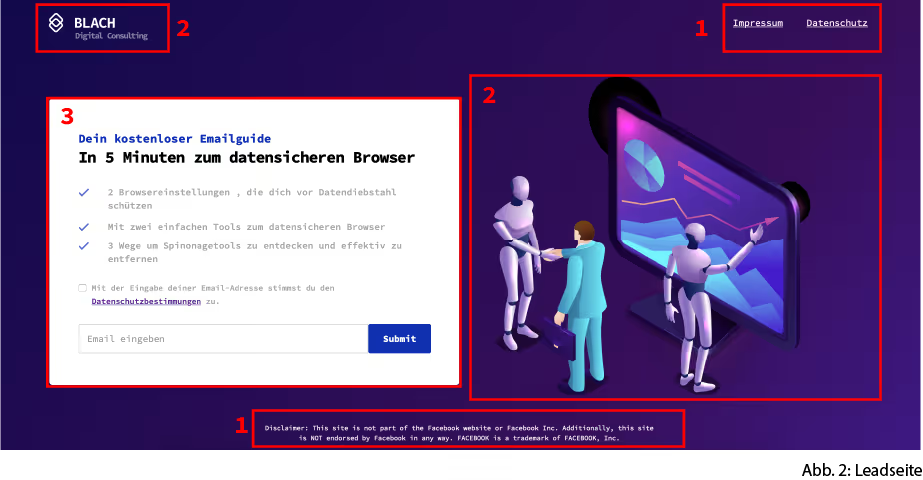
Lead page: The page is simple and dark in design and aims to encourage the user to enter their email address. It consists of the administrative sections (1), the secondary features (2), and the conversion goal/form field (3), which completes the form when the email address is entered.
Both the lead page and the cookie banner can be accessed via separate links. The URL of the landing page for website C is florianblach.com, and the landing page for website D is florianblach.com/real-home.
data collection
Generating user traffic: Users are directed to one of the two landing pages in equal proportions with the help of a Facebook advertisement. For this purpose, a Facebook advertising account is set up under the name Florian Blach Consulting and looks as follows:
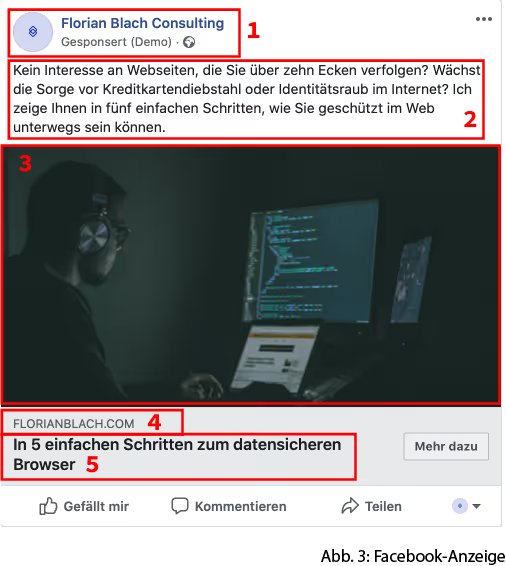
The link to the landing page in the first advertisement is florianblach.com/real-home , which is the link to website D. The entire advertisement is then duplicated and only the link from florianblach.com/real-home to florianblach.com, the page with the cookie banner (website C), is changed. For the user, no parameters have changed visually between the two advertisements; only the link to the landing page has changed, which is not visible to the user. When the advertisement is displayed, interested parties who are attracted by the advertisements are directed in equal parts to website C or website D.
evaluation
Several tracking technologies are used to enable a detailed evaluation of usage behavior:
- The Facebook pixel is a tracking code that is directly linked to the Ads Manager and is triggered as soon as an "action" is performed on the corresponding website, such as completing a purchase or visiting a website.
- Google Analytics, Google Tag Manager, and Hotjar are connected to the site in the backend. Google Tag Manager can be used to create tags that define the actions that users can perform on the website. These tags are triggered by so-called triggers. As soon as the user triggers a corresponding trigger through their action, the tag is 'fired' and collected as information with Google Analytics. This allows the actual user flow to be recorded and the clicks on the individual buttons of the cookie banner and the newsletter registration to be evaluated.
Google Analytics allows data from various tracking technologies to be merged and compiled into an overall picture (bounce rate, conversion rate, and user flow). Hotjar can be used to create heat maps of the desired pages, which record mouse clicks and movements and thus visually represent user behavior.
In order to make the results transparent with the help of Google Analytics, three different segments are created to divide the test groups. In addition to the existing samples Website C and Website D, another test group, Lead, is created. This group includes all users who have actually left their email address. To evaluate the results, the observed value was compared with the calculated expected value. The chi-square test was used to check whether the hypotheses were correct. Values less than 5% are statistically significant.
Evaluation of the sample
A total of 1,433 users visited the two websites. Website C had 682 users (47.5%) and website D had 751 users (52.4%). The target group was essentially determined by the Facebook algorithm when there was interest in the advertisement shown. Accordingly, there was no direct targeting based on age or gender, but rather indirect targeting via the Facebook algorithm. A total of 43.5% of all website visitors were between 35 and 54 years old, 22.6% were between 18 and 34, and 33.8% were 55 years old or older. The gender distribution is striking. Although no specific gender restrictions were applied, interest among male users was significantly higher: 71.6% of website visitors were male and only 28.5% of all users were female. Although no restrictions were placed on specific devices, there is a clear trend toward mobile use: 80.6% of users accessed the website via a mobile device, 9.3% via a tablet, and 10.0% via a desktop computer.
Usage behavior using the example of the conversion rate
In order to measure usage behavior technically, we focus on the conversion rate in our experiment, which in this case is measured by the number of successful newsletter sign-ups. Google Analytics calculates this as follows:
(Number of conversions / Number of sessions) * 100
In total, all sessions on website C and website D resulted in 32 conversion targets being achieved. With 1,518 sessions, this corresponds to a conversion rate of 2.1%. The chi-square test in Table 3 Conversion shows with a probability of 61% (p=0.39) that the cookie banner has a positive effect on the conversion rate. A total of 32 leads, 18 on website C and 14 on website D, can be attributed to this.
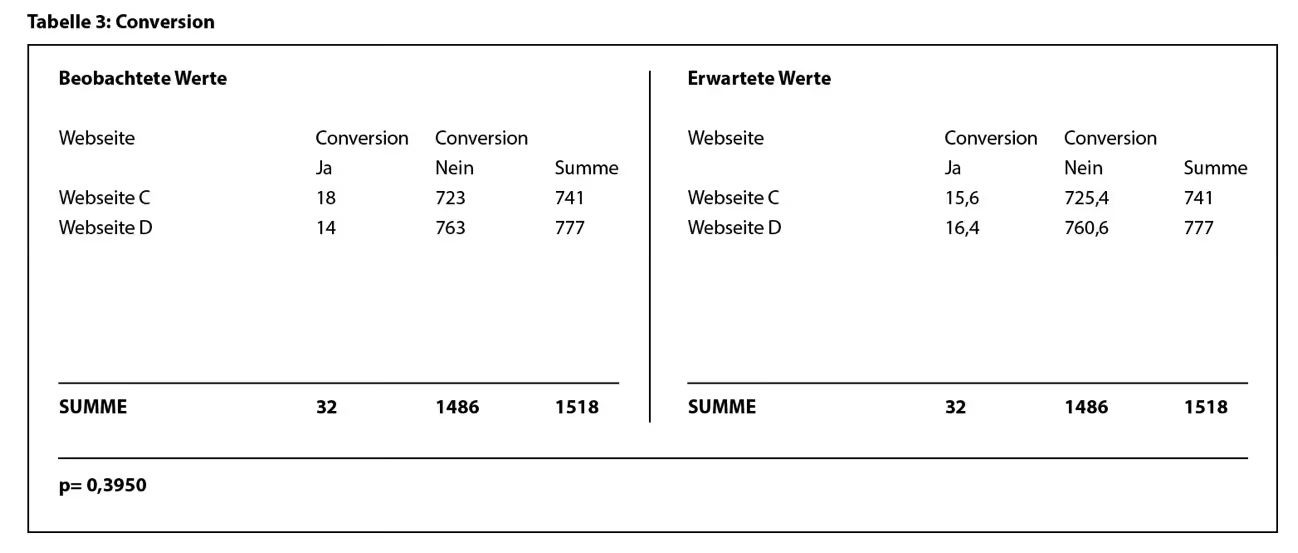
The expected value (see Table 3: Conversion) for website C is 15.6, which is below the actual value of 18, whereas for website D, the expected value of 16.4 is above the actual value of 14. Since the session duration shows that the longer the time spent on the page, the higher the probability of a conversion, and since the cookie banner statistically significantly increases the time spent on the page, it can be concluded that the cookie banner contributes to an increase in conversion.
User flow during conversion
In addition to quantitative data, user flows provide information about how users reached the conversion goal. Based on this insight, different groups can be compared within the cookie banner, depending on their click behavior. When looking at the converted user group in the cookie banner, it is noticeable that the group that selected the Accept button (eleven users) was more than twice as likely to become a lead as the user group that selected the Decline option. Only five people who had previously selected " Reject " became leads. In addition, another lead was generated by selecting the statistics checkbox and then accepting the cookies. It is noteworthy that after selecting the statistics checkbox, the " Accept All " button was clicked instead of "Accept Selected."
When comparing the conversion rate for website group D, it is noticeable that 100% of conversions took place directly without first visiting the legal notice or privacy policy pages. None of the users who first viewed the legal notice or privacy policy converted.
User behavior on the cookie banner
Another aspect we would like to highlight is specific user behavior on the cookie banner. The events assigned by Google Tag Manager are suitable for this purpose. A total of 715 events were executed, with an average of 1.53 events per session. The heat map shows where the clicks occurred. The dark red areas were clicked on more frequently than the light areas. (Fig. 17: Heat map)

The two most frequently triggered events were Reject all (cookies) with 266 clicks (37.20%) and Accept all (cookies) with 261 clicks (36.50%), while the third button, Accept selection , received 57 clicks (7.97%). A further 65 clicks, corresponding to 9.09% of events, were tracked when clicking on the statistics checkbox, followed by clicks on the email form, which should not be confused with a completed conversion, with 5.61% of all events. The privacy policy was only clicked once. Since all three selection buttons were weighted equally, it can be seen that the Accept Selection button was selected significantly less often.
In the mobile view, the selection buttons are arranged one below the other. For this reason, the Accept Selection button is in the last position. In an A/B test, the next step could be to test whether the positioning of the button influences user behavior.
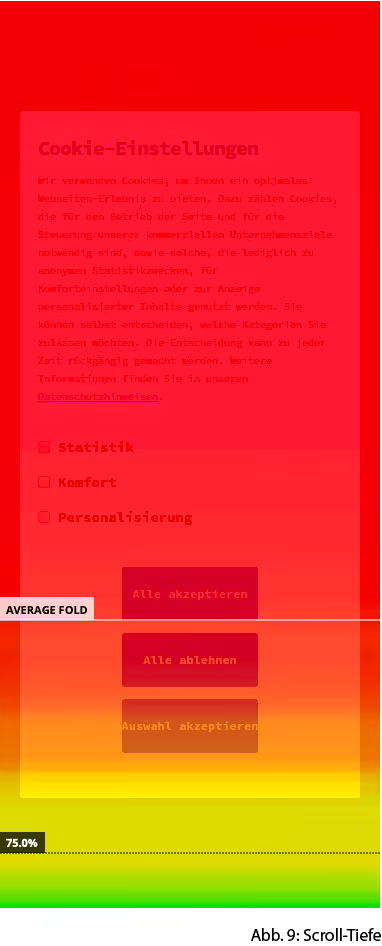
Figure 9 Scroll depth illustrates the average scroll depth on mobile devices. The red areas indicate the areas of the screen that the majority of users were able to see, while the yellow areas were viewed by 75% of users. The Accept All button is located just above the average screen height and was therefore visible to 100% of users. The Reject All button is below the average screen height, but was still viewed in its entirety by 99.47% of users. The Accept Selection button, on the other hand, was only viewed in its entirety by 91.9% of users.
Interpretation of results
The results of the study do not confirm the assumption that cookie banners generally worsen the conversion goals of websites. The cookie banner was highly likely to improve the number of conversions. This could be related to the fact that the cookie banner helps users on the site exceed the ten-second threshold, during which the number of conversions has increased. With regard to mobile use, no difference was found between websites with and without cookie banners. The number of users who consented to the processing of personal data in the form of cookies is similar to the number of users who refused. However, users were significantly less receptive to explicitly selecting the use of individual cookies. The corresponding clicks on the checkboxes for selecting and deselecting cookie types are also low. The privacy policy recorded one link click. The following possible causes are suggested to explain these findings:
Trust and transparency through cookie banners: One explanation for the increased conversion rate due to cookie banners could be that they increase end-user trust. Users may associate the display of cookie banners with the fact that their personal data is being processed in accordance with data protection regulations and that their data is therefore protected. It is striking that the number of users who clicked on "Accept" were also more likely to achieve the conversion goal. This leads to the conclusion that the design of the cookie banner could be decisive in how data-secure the website is perceived to be and, accordingly, in how likely the user is to trust the website enough to enter their personal data.
Micro-investment through cookie banners: By being forced to interact with the banner, the user has already made a form of investment before visiting the actual website. This consists of the user engaging with the cookie banner, even if only superficially. This had to happen at the latest as soon as the user became active by clicking on the corresponding buttons. Now, the user is more likely to enter their email address than if they had been asked for their email address in the first step. The reason for this behavior is that the user has already made a mental investment in the form of entering their data, which, from a psychological point of view, should not be meaningless.
Choice regarding data processing: In general , we have found that the proportion of people who explicitly consent to individual categories of data processing is low. This finding raises the question of the usefulness of these options. Furthermore, there is a lack of clear legal basis or rulings that clearly break down the use of the options. In this context, our experiment would like to draw particular attention to the arrangement of information at different levels. Since the GDPR states that the choice of data processing may only apply in certain cases and not in general, our experiment assumes that a downstream choice cannot be permitted. However, the number of users who actually made use of differentiated choices in data processing in the context of this study shows a discrepancy in relevance between the end user and the GDPR.
Conclusion
In general, the importance of the cookie banner for consumers cannot be refuted in our experiment. Since the cookie banner also has a positive effect on the conversion goals of website operators, there are no objections to the selection made in this study regarding consent to data processing. Furthermore, the entire experiment could be conducted in an area that is not primarily concerned with data protection. This would certainly rule out the possibility that data protection itself is not a factor in the decision on how to deal with the cookie banner.
The speed at which users interact with the banner shows that only a few users have read the cookie text in full. In addition, visitors did not seek out the link to further privacy information. Given the increasing number of cookie banners and the growing number of internet-savvy people, the question arises as to the usefulness of the obligation to provide information or explain how cookies work. With this experiment, we are assuming that it is not necessary to provide information about the use of cookies in this conspicuous manner on every website. If, for example, the following were omitted:
- The complexity of implementing the cookie banner in a manner that is legally sound would be reduced. In the implementation, either all cookies could be accepted or all cookies could be rejected. This alternative would eliminate the technical hurdle in implementation and in assessing which functions the individual cookies actually have and which of the three categories they should be classified in. This would significantly reduce the development costs of implementation and the legal leeway, or, in the event of a dispute, the legal uncertainty.
- Furthermore, the size of the cookie banner could be significantly reduced by eliminating the options. The research paper argues that it is not possible to design a cookie banner for mobile devices that meets all legal requirements and at the same time does not force the user to take action or interrupt the user flow in the short term. The GDPR expresses the desire to inform users about the data processing of cookies in as non-disruptive a manner as possible. This goal could be better achieved by eliminating the options.
The significantly smaller size means that the cookie banner does not appear obtrusive, yet still gives the user the option to interact with the banner. If the user still wants to select or deselect individual cookies, this can be done in the privacy policy. It can be assumed that the simplified design will reduce interaction with the cookie banner. If there is no interaction with the cookie banner, no data may continue to be collected.
Standardization of cookie settings in browsers: Another suggestion would be to standardize cookie selection through browser default settings. This is not a new concept; it was already developed in the 1980s but failed to gain acceptance. With this alternative, users would not only set parameters such as language when installing the browser, but also how cookies are handled. For example, individual rules could be set for the use of personal cookies. Furthermore, users could specify exceptions for certain websites. When visiting websites, these settings would then be applied automatically by browsers to the website without any further action on the part of the user. This would minimize the mandatory interaction with the cookie banner. Furthermore, Facebook, for example, could exclude users who generally reject the use of cookies when placing advertisements. This would reduce the risk of purchasing worthless traffic. Similar efforts have already been made with the Do Not Track standard.
Cookie wall: Furthermore , the anti-business practice and requirement for cookie walls should be removed. This is an attack on the concept of data-driven business models. This particularly affects companies that have built a business model based on collecting data and can therefore offer free use of the product in the sense of no monetary usage fee for the consumer. These companies are being forced to forego payment from users in the form of data and still allow users to make full use of the platform. This puts data-driven business models under enormous pressure, which is why this paper argues that websites should have the right to exclude users who do not consent to data processing.